uttam@triplew.in
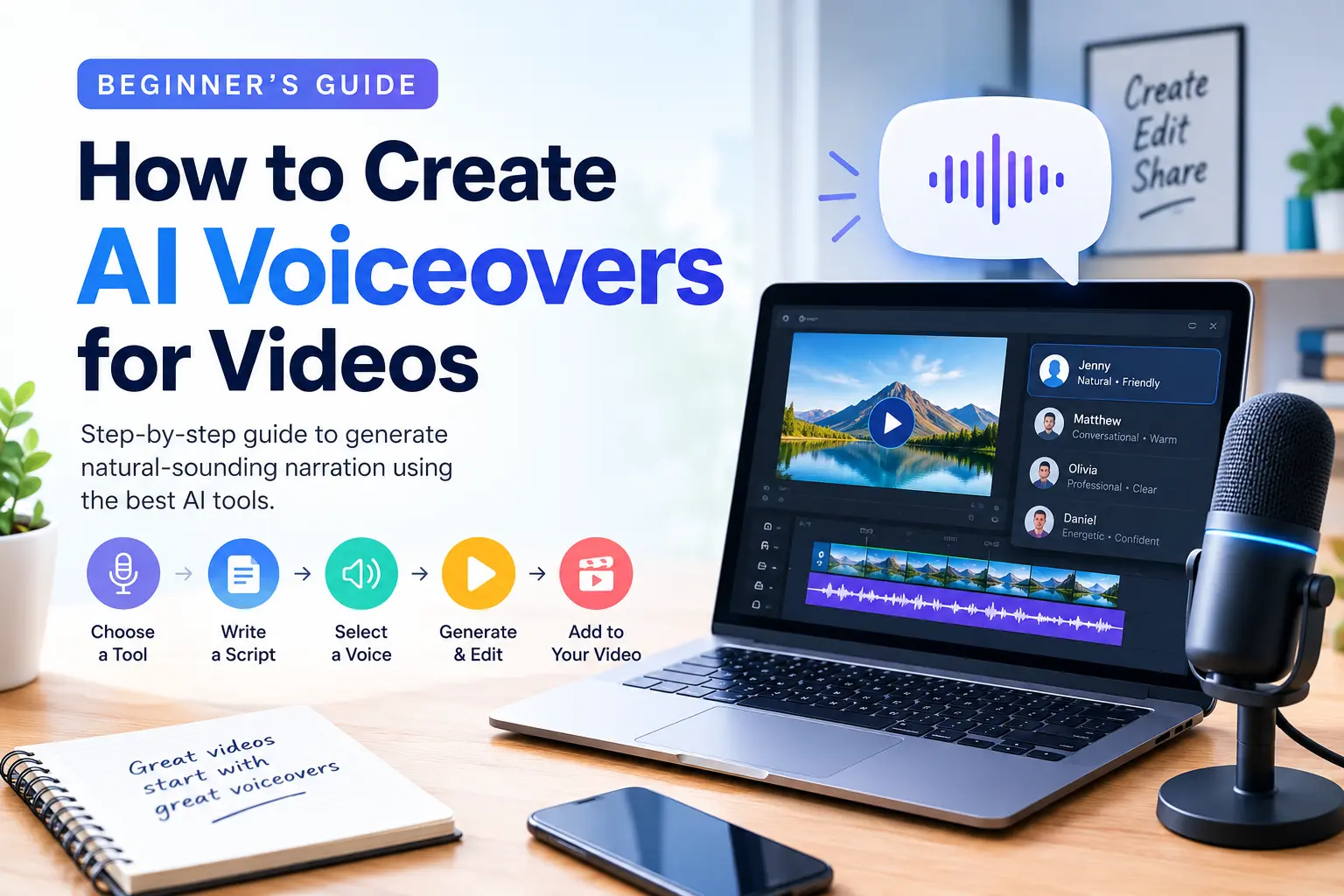
AI voiceovers are changing the way content creators produce videos. Whether you create YouTube videos, Instagram Reels, tutorials, product advertisements, or educational content, AI voice generators can help you add natural-sounding narration without recording your own voice.
The best part? You don’t need expensive recording equipment or professional voiceover experience to get started.
In this guide, you’ll learn how to create AI voiceovers for videos, which tools to consider, and how to make your narration sound more natural and professional.
What Is an AI Voiceover?
An AI voiceover is narration generated using artificial intelligence and text-to-speech technology. You simply enter your script, select a voice, and let the tool convert your text into spoken audio.
Many modern AI voice generators offer different accents, languages, speaking styles, and voice options. Some also support emotion, pronunciation adjustments, and voice cloning with appropriate authorization.
AI voiceovers are useful for YouTube videos, explainer videos, online courses, presentations, social media content, and marketing campaigns.
Step 1: Choose an AI Voice Generator
The first step is selecting an AI voiceover tool that suits your needs. Here are some popular options:
- ElevenLabs: Known for expressive, natural-sounding speech and a range of voice-generation features.
- Murf AI: Useful for business presentations, training videos, and professional narration.
- Speechify: Offers text-to-speech features for reading and narration workflows.
- Canva: Convenient for creators who want to combine voiceovers with video and design tools.
- CapCut: Provides video editing features and text-to-speech options in supported versions and regions.
Before choosing a tool, compare its voice quality, language support, export options, pricing, and commercial-use terms. Free features and usage limits can change over time.
Step 2: Write a Clear Video Script
A good voiceover starts with a good script. Even the most advanced AI voice generator cannot make confusing writing sound completely natural.
Write short, conversational sentences that are easy to understand when spoken aloud. Avoid unnecessary jargon, long paragraphs, and complicated punctuation.
For example, instead of writing:
“Artificial intelligence facilitates the optimization of content production workflows.”
Try:
“AI helps you create content faster and more efficiently.”
Read your script aloud before generating the audio. This helps you identify awkward phrases, missing pauses, and sentences that sound unnatural.
Pro tip: Add commas, periods, and paragraph breaks where you want the AI voice to pause. Some tools also support dedicated pause or pronunciation controls.
Step 3: Select a Natural-Sounding Voice
Once your script is ready, choose a voice that matches your video’s purpose.
For educational tutorials, a clear and friendly voice usually works well. Promotional videos may benefit from an energetic delivery, while documentaries often suit a calm, measured tone.
Pay attention to these factors:
- Voice style: Choose a tone that fits your content.
- Accent and language: Match your target audience.
- Speaking speed: Avoid narration that sounds rushed or unnaturally slow.
- Pronunciation: Check names, technical terms, abbreviations, and numbers.
Generate a short sample before producing the entire voiceover. Listening to a preview can save time and help you select the right voice.
Step 4: Generate and Download the Audio
After selecting your voice, paste your script into the tool and adjust any available settings, such as speed, stability, or expressiveness.
Click the generate button to create the narration. Listen to the result carefully and regenerate any sections that contain mispronunciations, unnatural pauses, or inconsistent delivery.
When you’re satisfied, export the audio in a format supported by your video editor, such as MP3 or WAV.
For longer videos, generating narration in smaller sections can make corrections easier and help you maintain consistent pacing.
Step 5: Add the Voiceover to Your Video
Now it’s time to combine your AI narration with your visuals.
Open a video editor such as CapCut, Canva, DaVinci Resolve, or Adobe Premiere Pro, depending on your needs and budget.
Follow these steps:
- Import your video clips and AI-generated audio.
- Place the voiceover on the audio timeline.
- Align the narration with the corresponding scenes.
- Add background music if appropriate.
- Adjust audio levels so the narration remains easy to hear.
- Preview the complete video and correct timing issues.
Keep background music quieter than the narration. Avoid sound effects that distract from the spoken content.
You can also add captions to make your videos more accessible and easier to follow without sound.
Step 6: Improve the Quality of Your AI Voiceover
A generated voice can sound artificial if you use it without reviewing the result. A few simple improvements can make a noticeable difference.
First, use natural language and vary your sentence structure. Second, adjust pauses to match the rhythm of your visuals. Third, correct unusual pronunciations using phonetic spellings or pronunciation controls when available.
Listen to the finished video using headphones and ordinary speakers. Check for abrupt cuts, excessive silence, inconsistent volume, and audio that feels out of sync.
Always review the final result before publishing.
Is It Legal to Use AI Voiceovers on YouTube?
AI-generated narration can be used in videos, but you should check the voice generator’s license and the platform’s current policies.
Use voices you have permission to use, and obtain appropriate consent before cloning someone’s voice. Avoid impersonation, misleading viewers, or using a recognizable person’s voice without authorization.
YouTube monetization depends on more than whether a video uses AI. Originality, meaningful value, and compliance with monetization policies remain important. Realistic synthetic content may also require disclosure in certain circumstances.
Conclusion
Creating AI voiceovers for videos is easier than ever. By choosing a suitable voice generator, writing a conversational script, reviewing the generated audio, and syncing it with your visuals, you can produce professional-sounding narration without a traditional recording setup.
Start with a short video, experiment with different voices, and refine your workflow as you gain experience.
Whether you’re a YouTuber, blogger, educator, or business owner, AI voiceovers can help you produce content more efficiently while keeping your audience engaged.